Put a gate between the internet and your origin servers.
BurrowGate is a self-hosted reverse proxy and access gateway. It blocks bots and scrapers, enforces route-level access policy, terminates TLS, and gives you full visibility into every request - all from one dashboard you run yourself.
Runs on infrastructure you already trust
One gateway, full control
No per-request pricing, no third-party seeing your traffic, no black-box rules. BurrowGate runs on your own VPS and answers only to you.
Stop bots before the origin
Identify 55 known search, social, SEO, archive, and AI bots, then block whole categories or individual agents per site or route. Challenges, managed WAF rules, and layered rate limits handle the rest.
See every request
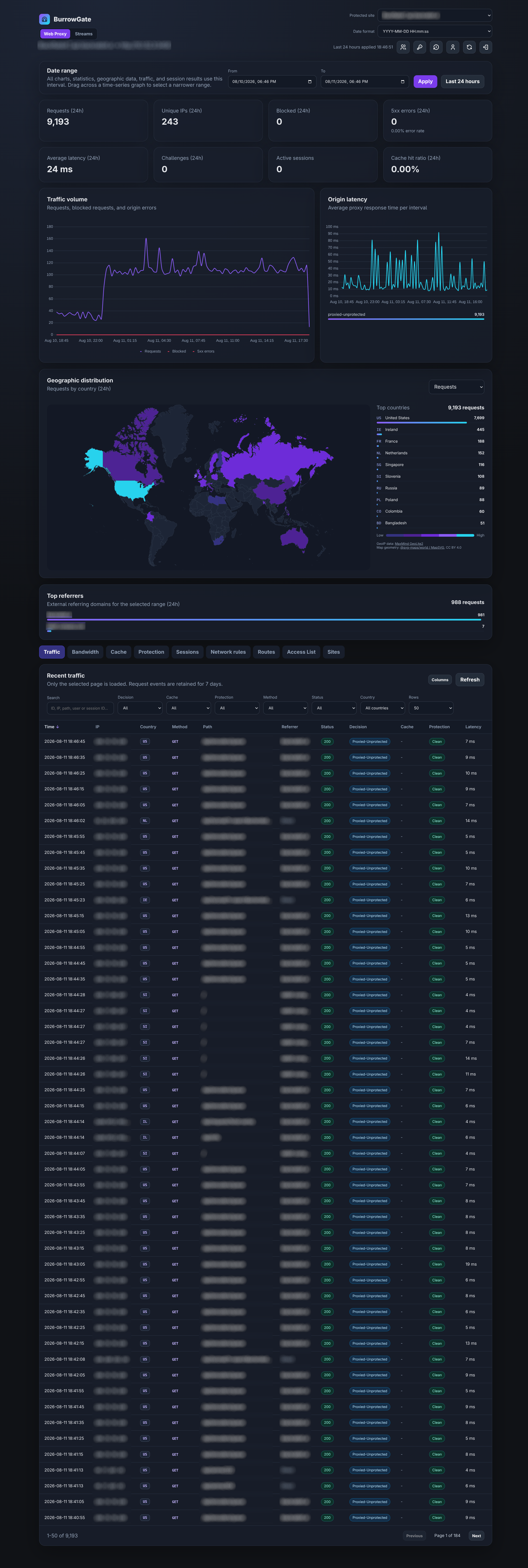
Paginated traffic, session, and rule monitoring, bot identities and verification details, Top bots, per-bot graphs, GeoIP and ASN analytics, and Prometheus/OpenTelemetry export for your existing stack.
Own your data, own the rules
EUPL-1.2-licensed and self-hosted on your VPS. Deploy with Docker Compose, back up SQLite/Postgres/MySQL like any other database, and change the source whenever you need to.
Everything a production edge needs
From TLS termination to WAF rules to TCP/UDP streams - BurrowGate covers the full path between the internet and your origin.
Reverse proxy & TLS
Multi-site hostname routing, automatic Let's Encrypt certificates, SNI, and transparent HTTP/HTTPS/WebSocket proxying, or serve static files straight from disk (no backend required). Accept PROXY protocol v1 and v2 from trusted load balancers while keeping direct connections available.
Bot & abuse protection
Category-aware bot identification and per-site/per-route blocking, optional IP verification, bot analytics, managed WAF rules, and challenges.
Network & access control
IPv4/IPv6/CIDR, ASN, and country rules, per-route access modes, TOTP/WebAuthn-backed access lists, OIDC SSO, and syncing auto-banned IPs to an external UniFi, nftables, OVH, or AWS firewall.
Privacy network detection
Opt-in Tor exit-node and dynamic ASN category detection (VPN, datacenter, ISP/telecom, and more) with monitor or block modes per site, route, or Stream, refreshed daily from a published category list.
CrowdSec
Enforce CrowdSec Local API decisions on sites, routes, and Streams, with captcha decisions served by the challenge chain and optional AppSec (WAF) inspection per route. Decisions are held in memory, so no request waits on the Local API.
Rate limiting
Fixed-window, sliding-window, and token-bucket limiters keyed by IP, session, or application header.
Load balancing & health
Priority failover, round robin, and weighted round robin with per-origin health checks, latency graphs, and webhook notifications.
Monitoring & GeoIP
Traffic, bandwidth, and session analytics with an interactive country map, a Top ASNs list, OpenMetrics export, and a dedicated Host page with live CPU/memory/disk/network status and internet connectivity graphs.
API automation
Automate the dashboard API with full-access tokens that inherit the owner's permissions and a live OpenAPI 3.2 document, or use tightly scoped read-only tokens for monitoring integrations.
High Availability
ExperimentalRun a cluster of nodes with automatic majority-quorum failover, split-brain protection, and no shared database - each node serves from its own.
A dashboard for every layer of the edge
Traffic, sessions, network rules, streams, and bandwidth - all in one control panel.
Deploy in minutes
A Linux VPS, Docker, and a domain pointed at it is all you need. BurrowGate generates a dashboard password, encryption key, and temporary certificate on first boot.
Download the Compose file
Create a directory and fetch the production-ready Compose configuration.
Start the container
BurrowGate binds ports 80 and 443 and stores runtime data in ./data.
Sign in and add a site
Read the generated password, open the dashboard, and point a hostname at an origin.
# create a directory and fetch the Compose file
mkdir burrowgate && cd burrowgate
curl -fsSLO https://raw.githubusercontent.com/Rabbit-Company/BurrowGate/main/docker-compose.yml# start BurrowGate
docker compose up -d
docker compose logs burrowgate
# read the generated dashboard password
docker compose exec burrowgate cat /app/data/bootstrap-admin-password.txthttps://SERVER_IP/_burrowgate/adminFull install steps, environment variables, and the config reference live in the docs.
Built in the open, improved by its users
BurrowGate is EUPL-1.2-licensed and developed on GitHub. Report issues, request features, or just come talk shop on Discord.